Download the best free blood pressure app (top 5 picks)
Looking for the best blood pressure app? You are in the right place.
Advertising
The right app turns your home readings into clear, shareable numbers.
Keep reading. Below are 5 trusted picks, how they work, and what to avoid.
Editorial disclaimer: This article is an independent, advertising-supported publication for general informational and educational purposes only. It is not affiliated with, endorsed by, or sponsored by any of the apps or companies mentioned. The content does not constitute medical advice, diagnosis, or treatment, and should never replace the opinion of a qualified healthcare professional. A blood pressure app records and shares readings but does not diagnose or treat any condition, and readings depend on a validated cuff and proper technique. App ratings, features, and availability may change, so always confirm current details on the official app store page. If you have concerning readings or symptoms, consult a doctor or seek emergency care.
What is the best free blood pressure app?
The best free blood pressure app for most people is Cardilog, because it keeps all core tracking tools free with no paywall. Still, the right pick depends on your setup.
Here is the key thing to know first. A phone app does not measure your blood pressure by itself. It records, charts, and shares readings that come from an arm cuff or monitor.
Be careful with any app that claims to read your blood pressure from your camera or finger on the screen. Those are not clinically validated and can give dangerously wrong numbers.
🚫 Caution: No phone can safely measure blood pressure with just a camera or fingertip. Always use a validated arm cuff for real numbers.
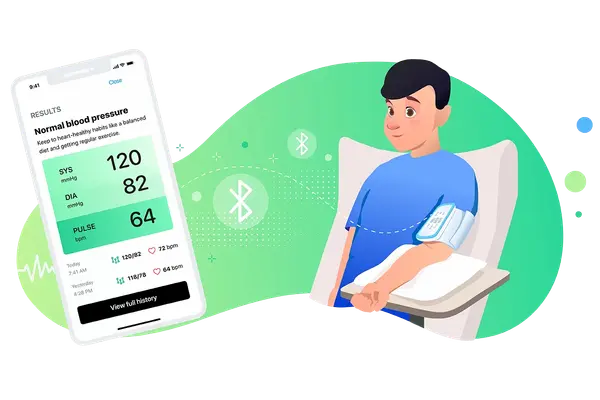
Cardilog, the best free blood pressure app overall
Cardilog is our top pick for a free blood pressure app that does not lock the basics behind a subscription. You get charts, trends, reminders, and reports at no cost.
It works on both iPhone and Android. You enter your readings by hand from any cuff, and it also syncs with Apple Health and Google Fit.

Cardilog Blood Pressure Tracker
Cardilog
Free, no paywall
Free
All core tools
Rated 4+
Doctor reports
The app shows clear color zones for your numbers, from normal to high. You can tag each reading with notes like stress, poor sleep, or a salty meal, so you spot your own triggers.
When it is time for a check-up, you export a clean PDF or CSV report. That gives your doctor real trends instead of a few loose numbers.
SmartBP, a solid free app for any cuff
SmartBP is a good free blood pressure app for iPhone users who want a simple log that works with any monitor. You can enter readings by hand or sync from a Bluetooth cuff.
It runs on iPhone and Apple Watch, and it connects with Apple Health. You get charts, morning and evening averages, and PDF reports to share.
Blood Pressure Tracker SmartBP
Evolve Medical Systems
Free with optional cloud
Free
Core logging
Rated 4+
iOS
& Apple Watch
SmartBP also calculates extra values like BMI and mean pressure, and it lets you filter readings by tags. That makes it a useful app to keep track of blood pressure over weeks and months.
Omron Connect, best for Omron cuff owners
If you own an Omron monitor, Omron Connect is the natural companion app. It pulls your readings over Bluetooth, so there is no manual entry.
Omron is a long-trusted maker, with over 400 million devices sold and users in more than 135 countries. The core app is free, and it exchanges data with Apple Health.

OMRON connect
Omron Healthcare
Free with optional premium
4.6★
Store average
Rated 9+
135+
Countries
The app shows daily, weekly, and monthly averages with color flags for high readings. You can build a PDF report and share it with your doctor in a few taps.
⚠️ Attention: Some Omron premium features need a paid plan in certain regions. The basic logging and sharing tools stay free.
Withings, best for family profiles
Withings is the best pick for households that need to track more than one person. Its app supports family profiles, so several people log readings in one place.
It pairs with Withings smart cuffs over Bluetooth or Wi-Fi, and it connects with Apple Health and Health Connect. Withings devices are clinically validated for accuracy.
Withings (Health Mate)
Withings
Free with optional Withings+
4.6★
Store average
Rated 4+
Family
Profiles
You can generate a secure report or a live link to your dashboard, giving your doctor quick access to your latest numbers. Some deeper analytics sit behind the Withings+ plan.
Apple Health, the free hub for iPhone users
On iPhone, Apple Health is a free hub that stores your blood pressure safely in one place. It comes pre-installed, so there is nothing extra to download.
Validated cuffs from Withings, Omron, and others sync straight to Apple Health. From there, apps like Cardilog can read those numbers and add clearer charts and reports.

Apple Health
Apple
Free, pre-installed on iPhone
Free
Built in
iPhone only
Hub
Syncs cuffs
Pre-installed on iPhone. No separate download needed. Pair it with a validated cuff and a companion app for charts.
One limit to know. Apple Watch cannot measure blood pressure on its own, not even the newest models. It can flag possible high patterns and nudge you to take a cuff reading.
What makes these the best blood pressure app picks?
These apps rise to the top because they mix reliable tracking, clear charts, and easy sharing with your doctor. Each one earns its spot in a slightly different way.
A great app for blood pressure does not just store numbers. It shows your trends over weeks, flags high readings by color, and turns scattered notes into a report your clinic can use.
Device compatibility matters too. Check that the app links with your cuff, your phone, and, if you use it, Apple Health, Google Fit, or Samsung Health.
How to use a blood pressure app step by step
Using any of these apps is simple, even if you are not tech savvy. The setup takes only a few minutes, and good technique keeps your numbers accurate.
1Download and set up the app
Install the app from the App Store or Play Store. If your cuff is smart, pair it over Bluetooth. If not, you will enter readings by hand.
2Measure the right way
Rest for 5 minutes, sit with your back supported and feet flat. Keep the cuff at heart level on bare skin, not over clothing.
3Log and tag each reading
Take two readings a minute apart and record the average. Add tags for stress, sleep, or medication so patterns are easy to spot.
4Share reports with your doctor
Export a PDF or CSV report before appointments. Doctors read averages over several days, not a single number.
Measure at the same times each day, often morning and evening. Use the same arm each time, unless your doctor tells you otherwise.
A word on safety and medical care
These apps are helpful tools, but they are not doctors. An app can only be as accurate as the cuff feeding it data, so use a validated arm monitor.
ℹ️ Important: A reading above 180 over 120 with symptoms like chest pain, shortness of breath, or confusion is an emergency. Seek urgent care, do not rely on the app.
Before you change any medication or worry about one high number, share your reports with your clinician. They can read your trends and give advice that fits your body.
Frequently asked questions about blood pressure apps
Can a phone app check my blood pressure without a cuff?
No. Current phones cannot safely take your blood pressure on their own. Any app that claims to check blood pressure with your phone camera or a finger on the screen is not validated. You still need an arm cuff for real numbers.
What is the best free blood pressure app?
Cardilog is our top free pick because it keeps charts, reminders, and reports free with no paywall. SmartBP, Omron Connect, Withings, and Apple Health are also strong free options for tracking blood pressure.
What is the best blood pressure app for iPhone?
For iPhone, use Apple Health as the data hub and pair it with a companion app like Cardilog or SmartBP for clear charts and PDF reports. This setup is one of the best iPhone blood pressure options and stays free.
Can my Apple Watch measure blood pressure?
No. No Apple Watch measures blood pressure directly. Newer models can spot patterns linked to high blood pressure over 30 days and prompt you to take a cuff reading. For a real number, use a validated arm monitor.
Which app is best for high blood pressure and hypertension?
Any app that logs readings, shows trends, and exports reports helps with hypertension. Cardilog and Omron Connect both flag high readings by color. Bring your reports to your doctor to guide medication choices.
Is a free blood pressure app accurate?
A free app can track data reliably when paired with a validated cuff and good technique. Accuracy comes from the cuff and how you measure, not the app alone. Avoid camera-only apps that claim to read blood pressure.
Can I share app readings with my doctor?
Yes. Most apps let you export a PDF or CSV, or sync through Apple Health or Google Fit, which many clinics accept. A clean report gives your doctor better data than a few loose numbers.
Which is the best free blood pressure app for you?
The best free blood pressure app is the one you will actually use every day. Cardilog is our top all-rounder, SmartBP is great for iPhone, and Omron or Withings shine if you own their cuffs.
Try one for free and see which feels right on your phone. Then, whatever you pick, keep your doctor in the loop and always measure with a validated cuff.