A free spam blocker app can stop all the robocalls and scam texts.
And this is the best app…
Hiya: the best free spam blocker app overall
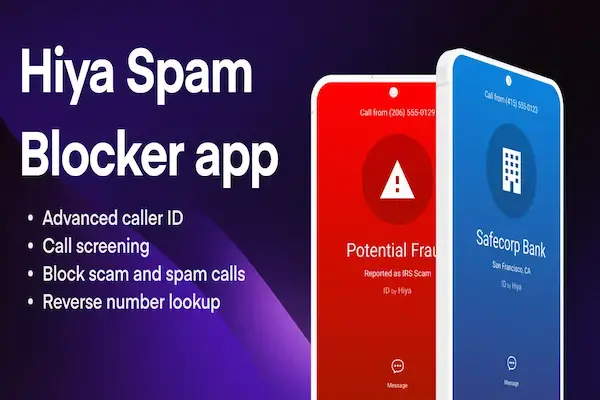
Hiya: Spam Blocker is the best free spam blocker app for most iPhone users because it shows caller ID, flags spam and lets you look up unknown numbers without paying.
The app is made by Hiya Inc and holds a 4.5-star rating from about 238,000 reviews on the App Store.
The free version covers the essentials. You get caller ID for many incoming calls, spam and scam warnings and number lookup. Premium plans add the Call Screener, AI voice detection and real-time fraud alerts. Hiya Premium costs $3.99 a month or $24.99 a year, according to the App Store listing.

Hiya: Spam Blocker
Hiya Inc · Free
⭐ 4.5 · 238K ratings · Utilities · 4+
One detail matters here. The Call Screener, AI voice detection and fraud detection work only in the United States and Canada. Hiya also says no system can catch every scam, so stay alert even with the app on.
Truecaller: the biggest caller ID community
Truecaller is the best choice if you want to search any phone number and see who is behind it, since its database is fed by a huge community of users.
The company says it is trusted by more than 500 million users. On the App Store it holds a 4.4-star rating from over 250,000 reviews. You can search local and international numbers for free and report spam to warn other people.
On iPhone, there is a catch. Automatic spam identification and blocking require a paid subscription. If you only want to check a strange number before calling back, the free version is enough. If you want calls flagged before you pick up, plan for Premium, which comes with a free trial for new users.

Truecaller: Premium Caller ID
True Software Scandinavia AB · Free
⭐ 4.4 · 252K ratings · Utilities · 4+
Truecaller also offers a Family Plan for up to 4 members. That is handy if you want to protect a parent who answers every call.
Whoscall: best for scam texts and links
Whoscall is the best pick when scam texts worry you as much as calls, because it checks numbers, links and even screenshots in one place.
The app comes from Gogolook and has a 4.7-star rating on the App Store. It was named a Global Finalist in the App Store Awards in the Cultural Impact category. Its Smart SMS Assistant catches phishing messages, and its caller ID identifies unknown calls and blocks scams automatically.
The Check tool is the standout feature. Got a text saying your package is stuck or your bank account is locked? Paste the link or upload a screenshot, and Whoscall tells you if it looks risky. Premium starts at $2.89 a month, and there is a $0.99 option just to remove ads.

Whoscall: Caller ID & Block
Gogolook · Free
⭐ 4.7 · 3K ratings · Utilities · 4+
Whoscall needs iOS 18 or later. Check your iPhone version under Settings, General, About before you download it.
Call Control: a simple robocall blocker
Call Control is a straightforward robocall blocker that uses a community blacklist to stop telemarketers and known spammers before your phone even rings.
The developer says more than 12 million people use it. The app is free to download and use, with a 4.5-star rating on the App Store. Its smart blocking works right after setup, and you can build a personal blocklist with any number you never want to hear from again.
It also blocks calls that carriers label as “Spam Likely” or “Scam Likely” and calls from violators of the Do Not Call list. Premium costs $9.99 per quarter or $29.99 per year. Keep in mind the iPhone app has not been updated since 2022, so newer apps on this list may react faster to fresh scam numbers.
Call Control: #1 Call Blocker
Call Control, LLC · Free
⭐ 4.5 · 6.6K ratings · Utilities · 4+
Malwarebytes: call and text filtering with extra security
Malwarebytes Mobile Security is the right app if you want spam call filtering plus protection against scam texts, fake websites and risky links.
It has a 4.5-star rating from about 110,000 reviews. Besides robocall filtering, it screens fraudulent SMS links and flags brand impersonation, like fake messages from banks or delivery services. It also includes web protection, a VPN and a scanner that checks if your email showed up in a data breach.
Here is the honest part. Malwarebytes is free to download and comes with a 7-day free trial of all features. After that, most protection needs a paid plan, while ad blocking stays included. It works best for people who want one app for the whole phone, not just calls.

Malwarebytes – Mobile Security
Malwarebytes Corporation · Free
⭐ 4.5 · 110K ratings · Utilities · 4+
Like Whoscall, Malwarebytes requires iOS 18 or later. Premium features are not shared through Family Sharing.
How to download a spam blocker app on iPhone
To download a spam blocker app on iPhone, get it from the official App Store and then turn it on in your Phone settings, or it will not filter anything.
Before you start, make sure your iPhone is updated and connected to Wi-Fi.
- 1Open the App Store and search for the app name, such as Hiya Spam Blocker.
- 2Check the developer name under the app title to avoid copycat apps.
- 3Tap Get and confirm with Face ID, Touch ID or your password.
- 4Open the app and follow the setup screens it shows you.
- 5Go to Settings, then Apps, Phone and Call Blocking & Identification.
- 6Switch the app on so it can label and block spam calls.
The most common mistake is skipping step 5. Without that switch, the app opens fine but never touches your calls. On older iOS versions, the same option sits under Settings, Phone.
What a spam call blocker does on your phone
A spam call blocker compares every incoming number with a database of reported spam, scam and robocall numbers and then labels, silences or blocks the call.
The database grows every day as users report bad numbers, so new scam numbers get caught faster.
Paid tiers usually add call screening, AI voice detection and fraud alerts during a live call. For most people, the free tier of a good app already cuts the noise a lot.
Your iPhone also has built-in tools. Silence Unknown Callers sends calls from numbers not in your contacts straight to voicemail. Filter Unknown Senders moves texts from strangers to a separate list. They work well together with any app above.
Why blocking spam calls matters more than ever
Blocking spam calls matters because a single answered call can cost you money, personal data or both, and scammers now use tools that sound very real.
Picture this. Your phone rings and the caller says your Social Security number was suspended. The voice sounds official. They ask you to confirm your number “to fix it.” The Social Security Administration warns that this script is a scam, and older adults are a frequent target.
Robocall trackers like the YouMail Robocall Index count billions of these calls in the United States every month. Many come from spoofed numbers that look local, so you are more likely to pick up.
⚠️ Watch out: scammers now use AI to copy voices. If a “relative” calls in panic asking for money, hang up and call that person back on the number you already have.
A spam blocker app is your first line of defense. You can also add your number to the free National Do Not Call Registry run by the Federal Trade Commission (FTC). It will not stop scammers, but it cuts calls from legitimate telemarketers. Report scam calls to the FTC too, since every report helps track the people behind them.
Frequently asked questions
What is the best free spam blocker app for iPhone?
For most people, Hiya is the best free spam blocker app for iPhone. It gives caller ID, spam warnings and number lookup at no cost. Whoscall is a strong second choice if scam texts are your main problem.
How do I stop spam calls on my iPhone for free?
Install a free spam call blocker, turn it on in Settings under Call Blocking & Identification and enable Silence Unknown Callers. Then add your number to the National Do Not Call Registry at no cost.
Is Hiya Spam Blocker really free?
Yes, Hiya is free to download and its basic protection is free. The Call Screener, AI voice detection and fraud alerts are part of Hiya Premium, a paid subscription.
Do robocall blocker apps work on Android too?
Yes. Hiya, Truecaller, Whoscall and Malwarebytes also have Android versions on Google Play. This guide focuses on iPhone because the setup steps are different.
Can a call blocker app read my contacts or messages?
On iPhone, call blocking runs through an Apple extension that checks numbers without opening your conversations. Each app lists the data it collects in the App Privacy section of its store page, so read it before you install.
Why do I still get some spam calls after installing an app?
Scammers switch numbers all the time, and a brand-new number may not be reported yet. Keep the app updated, report every spam call you get and leave Silence Unknown Callers on for extra protection.
Start blocking spam calls today
You do not have to answer one more robocall. Pick the app that fits you best, turn it on in Settings and let it filter the noise for you.
If you are not sure where to start, go with Hiya. It is free, easy to set up and covers the most common spam calls from day one.
ℹ️ Important: CDIN is an independent, advertising-supported content site. We have no relationship with, sponsorship from or control over the apps and companies mentioned. Prices, ratings and features may change, so always confirm on the official App Store page.